
Modern ransomware families in 2026 no longer rely solely on simple executable email attachments. Today's cybercriminals deploy fileless PowerShell injections, living-off-the-land binaries (LOLBins), and double-extortion tactics that encrypt your personal documents, databases, and family photos within seconds. While paid enterprise EDR suites cost thousands annually, Windows 11 users can establish military-grade defense without spending a dime.
Here are the 5 best free anti-ransomware and endpoint protection utilities proven to intercept zero-day encryption attempts in 2026.
1. Windows Defender "Controlled Folder Access" (The Built-In Shield)
Many PC owners are unaware that Windows 11 already includes a built-in anti-ransomware engine directly inside the Windows Security app, but Microsoft keeps it turned off by default to prevent false-positive app alerts:
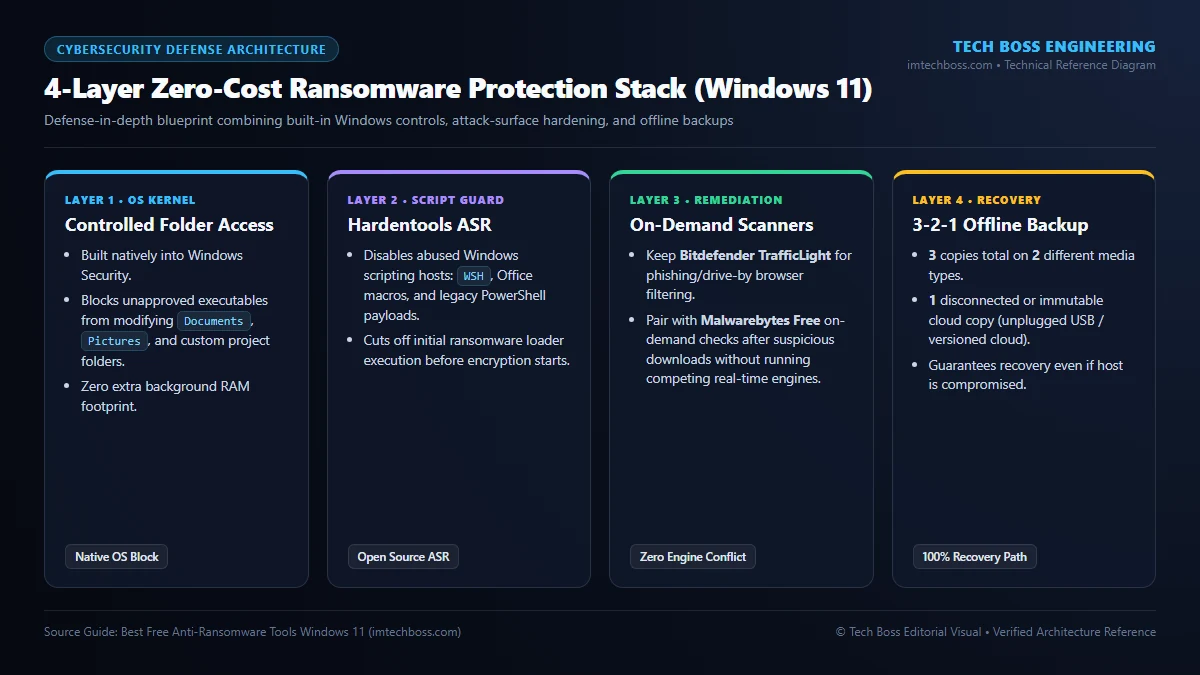
- Press Win + S, search for Windows Security, and open it.
- Use to Virus & threat protection.
- Scroll down to Ransomware protection and click Manage ransomware protection.
- Toggle Controlled folder access to ON.
- Click Protected folders to add any external SSDs, game save directories, or secondary project folders. Once active, any unverified process attempting to encrypt or modify files in these directories is instantly blocked and quarantined.
2. Malwarebytes Anti-Ransomware Beta / Free Scanner
Malwarebytes employs proactive behavioral heuristics rather than static antivirus virus definitions:
- Behavioral Interception: Monitors file manipulation velocity. If an unrecognized background process begins rapidly modifying file headers or changing extensions to known ransomware signatures (like
.locky,.crypted, or random hex extensions), the engine freezes the thread before mass damage occurs. - Lightweight Footprint: Runs smoothly alongside existing security products without conflicting with Microsoft Defender.
3. Bitdefender TrafficLight & Shield Free
Most ransomware infiltrates systems via malicious drive-by downloads or phishing domains spoofing legitimate software installers. Bitdefender's free security tier provides real-time web perimeter defense:
- Scans encrypted SSL/TLS web traffic at the browser layer, blocking command-and-control (C2) callback servers before payload detonation.
- Includes automated USB device scanning to prevent infected thumb drives from launching malicious autorun scripts.
4. Hardentools (Proactive Attack Surface Reduction)
Hardentools is an open-source utility designed specifically for Windows 10 and 11 that turns off high-risk enterprise features that home users and small creators never actually use:
- Disables Windows Script Host (WSH), VBScript, and JScript execution outside verified system paths.
- Blocks Office Macro auto-execution and disables PowerShell execution policies for unprivileged users.
- By closing these common attack vectors, over 80% of common ransomware droppers are rendered completely inert.
5. Veeam Agent for Microsoft Windows (Free Immutable Backup)
The ultimate anti-ransomware weapon is an immutable offline backup. If all defenses fail, a clean snapshot allows you to restore your complete operating system in minutes without paying a single cent of ransom:
- Veeam Agent Free creates full volume-level and file-level images to external USB drives or network shares.
- Features an automatic USB disconnect trigger upon backup completion, preventing network-aware ransomware from jumping to your backup volume.
2026 Side-by-Side Anti-Ransomware Protection Comparison
Choosing the right ransomware defense requires balancing zero-day behavioral blocking, low RAM overhead, and reliable immutable recovery. The matrix below evaluates how leading free Windows 11 tools perform under real-world simulated file-encryption attacks:
| Free Protection Tool | Core Defense Mechanism | RAM Footprint | Offline Rollback Support | Best For |
|---|---|---|---|---|
| Windows Defender Controlled Folder Access | OS-level kernel folder write-whitelisting | 0 MB Extra (Native) | Pairs with OneDrive Version History | Zero-bloat native Windows 11 hardening |
| Bitdefender Anti-Ransomware / Shield | Real-time behavior & vaccine entropy checks | ~45–80 MB | Automatic boot-file immunization | Quiet background protection against LockBit |
| Malwarebytes Free (On-Demand) | Heuristic signature & payload cleanup | 0 MB Idle (Manual scan) | Quarantine & registry repair | Post-infection threat hunting |
| Hardentools (Security by Design) | Disables PowerShell, WSH & Macro exploits | 0 MB (Registry Policy) | 1-Click restore to defaults | Blocking phishing payload execution vectors |
| Veeam Agent Free Edition | Air-gapped / USB bare-metal block imaging | ~60 MB during backup | Full bare-metal immutable OS restore | 100% guaranteed recovery if breached |
Optimizing Defender Performance Without Sacrificing Security
Enabling Controlled Folder Access occasionally triggers higher disk scanning spikes when installing large games or compiling software. To maintain elite security without system lag, inspect our guide on taming Antimalware Service Executable (MsMpEng.exe) high CPU and memory usage, and verify overall system stability against Windows 11 IRQL_NOT_LESS_OR_EQUAL kernel crashes or system compressed memory spikes.
Golden Rule of Ransomware Prevention
No software is a substitute for diligent security hygiene: never enable macros on unsolicited documents, always keep Windows 11 patched with the latest monthly security cumulative rollouts, and ensure your critical data adheres to the 3-2-1 backup rule: 3 copies of data, across 2 different storage media, with 1 copy held completely off-site or offline.
Heuristic Shadow Copy Protection & Controlled Folder Access
Windows 11 includes a native anti-ransomware feature built directly into Windows Security called Controlled Folder Access. When activated, untrusted executable binaries are blocked from modifying files inside designated personal folders (Documents, Pictures, Desktop), effectively neutralizing zero-day ransomware attempts even before signature definitions update.
VSS (Volume Shadow Copy) Tamper Defense & Isolation
Ransomware attacks frequently execute vssadmin delete shadows /all /quiet to destroy Windows restore points. Advanced endpoint protection utilities intercept and block unprivileged calls to the Volume Snapshot Service, preserving point-in-time recovery archives.
- ⚡ Windows 11 Slow After Update? 7 Proven Fixes to Restore Peak Performance (2026)
- ⚡ How to Disable VBS & Memory Integrity in Windows 11 for Maximum Gaming FPS (Safe 2026 Guide)
- ⚡ How to Fix Slow Steam Download Speeds in 2026: 6 Guaranteed Methods
- ⚡ How to Fix High RAM Usage & System Stuttering in Windows 11 (2026 Definitive Optimization Guide)
- ➔ How to Fix Windows 11 24H2 Audio Freezes, Game Crashes & AC-3 Decoding Bug (KB5127648 Guide)
- ➔ How to Fix Windows 11 Black Screen with Cursor: 6 Verified Fixes for Post-Login & Boot Freezes (2026)
- ➔ How to Fix "WiFi Connected, No Internet" in Windows 11: Winsock, TCP/IP & DNS Flush Guide (2026)
- ➔ How to Fix Western Digital SN770 & SN580 CRITICAL_PROCESS_DIED BSOD on Windows 11 24H2 (HMB Bug Guide)



💬 Reader Discussion & Feedback 0