Quick Answer: Upstairs speed drops and ping spikes in Nepal are rarely caused by the fiber line itself—they come from RCC concrete slabs blocking 5GHz Wi-Fi and cheap wireless repeaters causing Double NAT. Connect a secondary Wi-Fi 6 router upstairs via a single Cat6 Ethernet cable in Access Point (AP) mode and keep gaming PCs wired. Plan your exact setup in our Nepal ISP Wi-Fi & Ping Advisor.
Why 200–300 Mbps Fiber Feels Like 15 Mbps Upstairs in Nepal
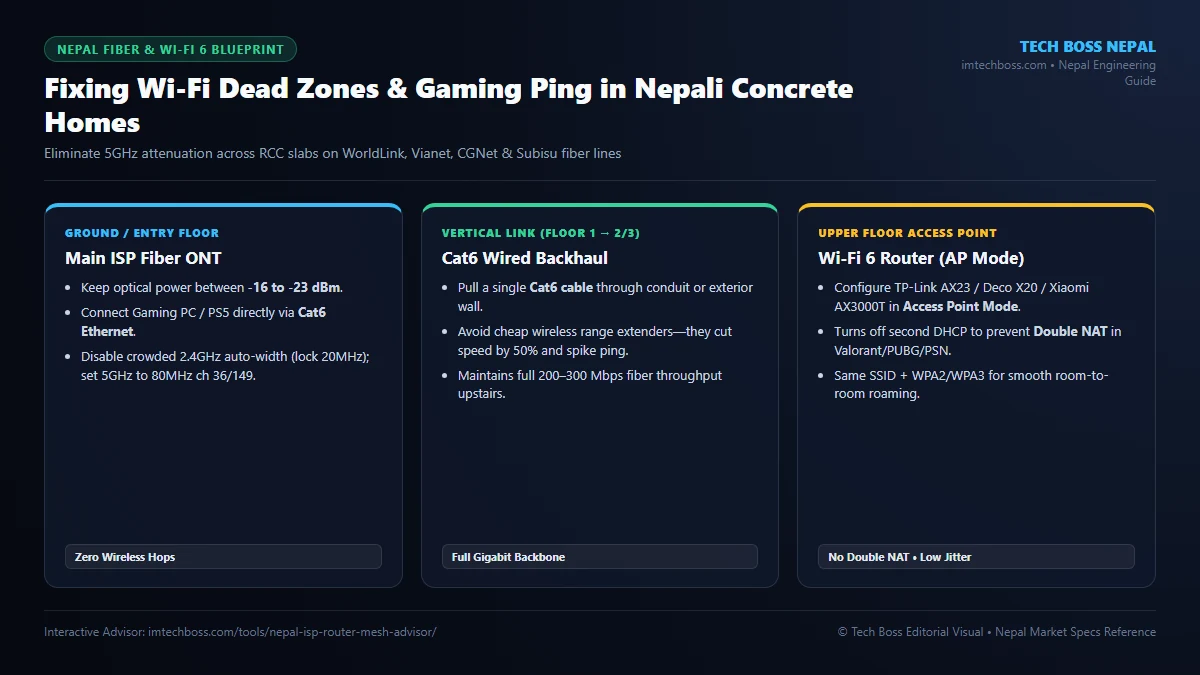
Most Nepali homes use thick brick walls and reinforced concrete (RCC) floor slabs packed with steel rebar. While 2.4GHz Wi-Fi travels farther, it is heavily congested across Kathmandu, Lalitpur, and Pokhara neighborhoods—causing 80–250ms ping jitter during Valorant, Counter-Strike 2, PUBG, or Zoom calls. Meanwhile, fast 5GHz Wi-Fi loses up to 70% of its signal strength after crossing a single concrete slab.
Step 1: Verify Your Fiber Optical Power Before Buying Hardware
Log into your WorldLink (Nokia/Huawei), Vianet, or CGNet ONT admin page (or check the ISP mobile app) and inspect RX Optical Power:
- Healthy Range:
-15 dBmto-23 dBm— clean fiber signal. - Degraded Range:
-26 dBmor lower — bent fiber patch cord or dirty splice; call ISP support for free re-splicing before buying any new router.
Step 2: Ditch Wireless Repeaters for Wired Cat6 Access Point Mode
Plug-in Rs. 2,000 wireless repeaters listen and retransmit on the same radio band, cutting usable throughput in half and adding massive bufferbloat. Instead, run a single Cat6 pure copper Ethernet cable from LAN Port 1 of your main ONT to the upstairs floor and connect a dedicated Wi-Fi 6 router (such as TP-Link Archer AX23, Deco X20, or Xiaomi AX3000T).
Crucial Setting — Enable Access Point (AP) Mode: Switching the secondary router from Router Mode to Access Point Mode disables its duplicate DHCP server and firewall. This eliminates Double NAT (which causes Strict NAT on PlayStation/Xbox and random voice-chat disconnects) while letting all devices share one clean local subnet.
Step 3: Lock Clean Wi-Fi Channels & DNS for Lower Gaming Ping
| Band | Recommended Channel Width | Best Non-Overlapping Channels | Ideal Devices |
|---|---|---|---|
| 2.4 GHz | 20 MHz (Never 40 MHz in cities) | Channel 1, 6, or 11 | Smart TVs, CCTV cameras, IoT plugs |
| 5 GHz | 80 MHz | Channel 36, 44, or 149 | Laptops, phones, work calls |
| Cat6 Wired | 1 Gbps Full Duplex | Direct LAN Port | Gaming PC, PS5, local AI server |
Set custom DNS to Cloudflare (1.1.1.1 / 1.0.0.1) or Google (8.8.8.8) on your Windows 11 network adapter to speed up domain lookups without touching ISP routing. If your Windows 11 PC still suffers high latency spikes even on Ethernet, check for background Defender or update thrashing using our MsMpEng.exe Fix Guide and Windows 11 Lag Repair Checklist.
Eliminating Bufferbloat During Evening Peak Hours in Nepal
Even with clean optical power and Cat6 Ethernet backhaul, family members streaming 4K YouTube or downloading large PlayStation updates during 7 PM to 10 PM peak hours can saturate your upstream queue and push gaming ping from 45ms to 190ms. This phenomenon is called bufferbloat, and cheap ISP ONTs rarely handle packet queuing gracefully under heavy simultaneous uploads.
If your household has remote engineers on Zoom alongside competitive gamers, ask your ISP support team whether your ONT supports Bridge Mode on LAN Port 1. Connecting a personal router capable of Smart Queue Management (SQM / CAKE QoS) such as a MikroTik hEX, OpenWrt-flashed Xiaomi AX3000T, or Asus RT-AX series router lets you cap upload/download queues at 90% of your plan speed, keeping ping flat even during full-speed downloads.
Finally, inspect your outdoor fiber drop cable and indoor yellow patch cord once every few months. Sharp 90-degree bends behind wooden cupboards or pinched door frames cause micro-attenuation that drops optical signal below -26 dBm and triggers intermittent evening packet loss across all Nepal fiber ISPs.



💬 Reader Discussion & Feedback 0